Shopify Canvas and Liquid Templates: What Agencies Should Do Now
The Fall ’26 Edition moved page structure back into Liquid and gave merchants an AI editor that rewrites theme code. Here is what changes for client work, and what does not.
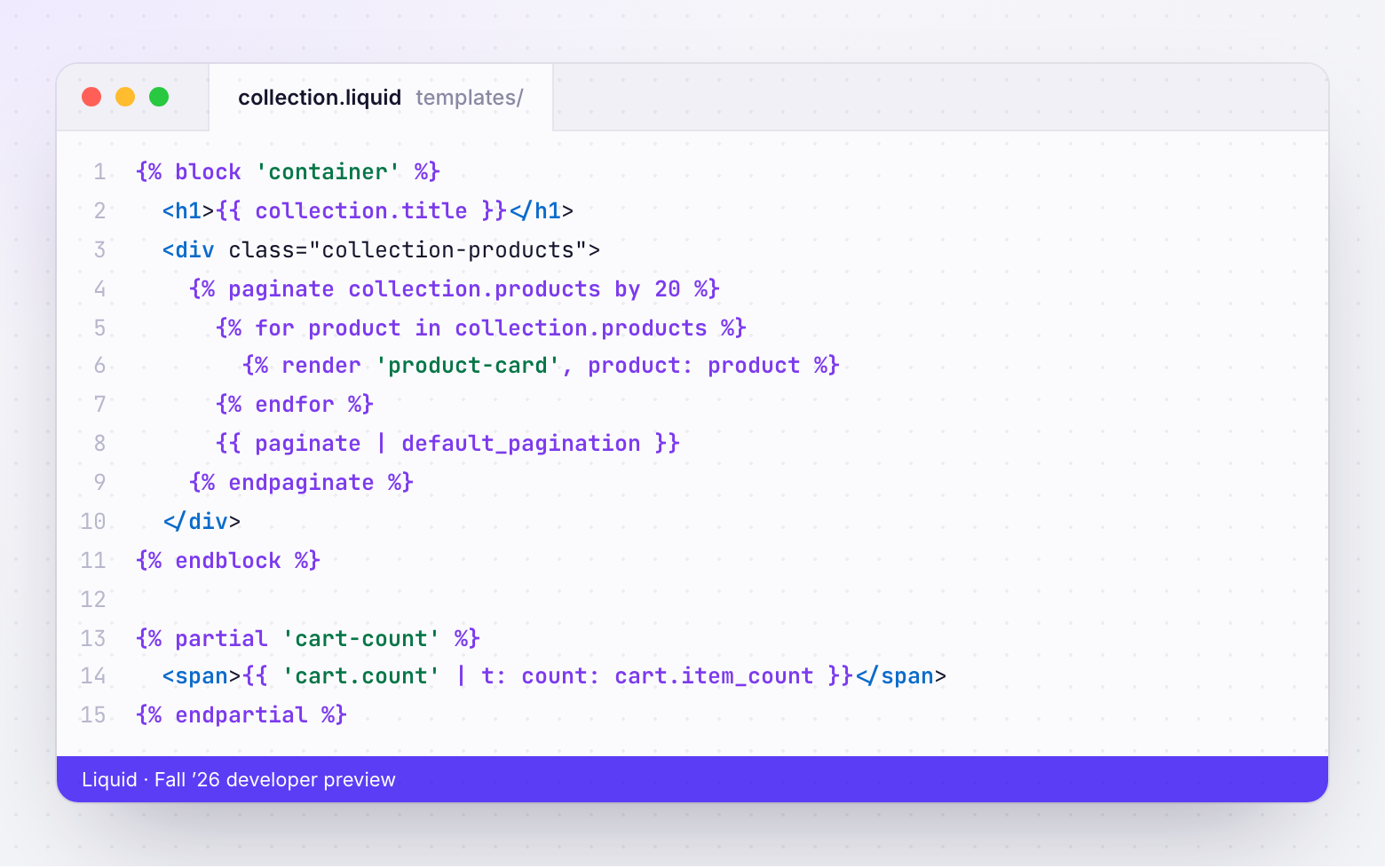
{% partial %} for the cart count.What actually shipped
Two related things landed between July and October 2026, and they are easy to blur together.
1. A new theme architecture (developer preview, July 2026)
Shopify published a developer preview in which a page's structure lives in the Liquid template rather than in a JSON file. The pieces:
{% block %}renders a file from theblocks/folder directly from a template. It takes named parameters, schema settings and body content (output with{{ block.content }}).{% partial %}wraps a named region that JavaScript can re-request from Shopify and swap in, covering much of what themes do today with the Section Rendering API.{% doc %}headers describe a block's parameters and types. Theme Check reads them and warns about unknown or mistyped parameters.- Liquid syntax additions: maths operators,
&&/||and array literals, made possible by moving themes onto a stricter parser first. - Agent guidance files such as
AGENTS.mdinside a theme, and Tailwind styling support announced for Liquid themes.
The rebuilt Skeleton theme on Shopify's GitHub uses this structure: no sections/ folder and every template ending in .liquid. The preview sits behind a store feature preview, and {% partial %} throws an "Unknown tag" error on stores where it isn't enabled.
2. Canvas (early preview, October 1, 2026)
Canvas is a new editing surface in Online Store → Themes. Every template sits on one artboard. Merchants click text to edit it, or ask Sidekick to change the theme. Under the hood, Canvas edits code, and Sidekick may convert JSON templates into Liquid templates. Shopify's Fall '26 developer post describes the new architecture as ready for merchants to edit with Sidekick in Canvas.
What Canvas can’t do yet
This is the part that matters for client stores. At launch, according to Shopify's changelog and the Canvas requirements page:
| Supported | |
|---|---|
| Shopify-built and custom themes (as a duplicate) | Yes |
| Third-party Theme Store themes | Not yet |
| App blocks and app embeds | Not yet |
| Theme updates after editing in Canvas | No |
| Downloading theme files | No |
| GitHub sync | Yes |
| Theme check before publish (errors block it) | Yes |
Read the third row again. Most agency-built stores run on a premium Theme Store theme with app blocks for reviews, subscriptions or upsells. None of that is editable in Canvas today.
The fourth row matters for maintenance contracts. A theme edited in Canvas stops receiving updates from its developer. If a client's in-house team tries Canvas on the live theme's duplicate and then publishes it, you have a fork that no longer gets vendor fixes.
The three new risks for agencies
Merchants can now change code, not just settings
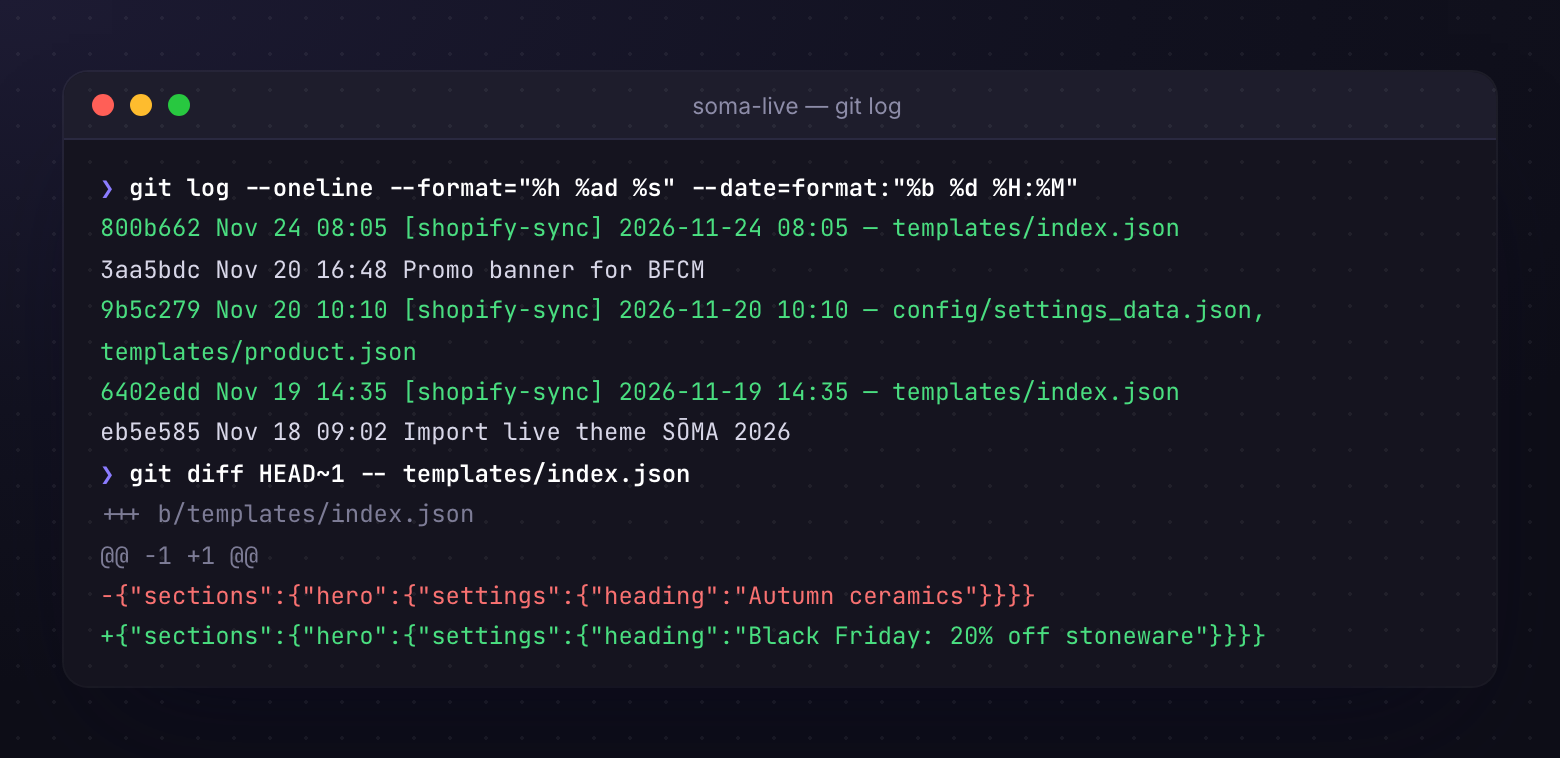
Before, a merchant in the theme editor could only change settings your schema exposed. With Sidekick in Canvas, a merchant can ask for a change that rewrites Liquid. That's great for small tweaks. It also means the theme in your repo and the theme on the store can diverge in ways that are not a settings_data.json diff.
Templates can change type
If Sidekick converts templates/product.json into templates/product.liquid, the classic editor reports no sections on that template. Any tooling that assumes JSON templates (your deploy scripts, template migration helpers, a git merge strategy for JSON) needs to handle both file types.
"Who changed this?" gets harder to answer
Canvas keeps its own autosave history behind a clock icon. That helps the merchant undo. It doesn't tell your team what changed since your last deploy. The fix is the same as for theme editor edits: track the live theme into git on a schedule, so every change becomes a commit you can diff. We covered the reasons in The Untracked Live Theme.
Timeline: what happened when
- May 2025Horizon and theme blocks
- June 30, 2026Shopify Scripts end
- July 2026Liquid templates developer preview
- Oct 1, 2026Canvas early preview
- Not before Q1 2027any forced editor change
Shopify's product lead for Online Store has said publicly that Canvas is intended to become the default editor in time, and that there will be no forced changes during peak season. Plan for Canvas to be normal in 2027, not in November.
What to do this quarter
Before BFCM: don't touch live themes
- Tell clients in writing not to open their live theme in Canvas until after peak. Give the reason: their theme and apps aren't supported yet and edited themes stop getting updates.
- If a client wants to try it, duplicate the theme and label it (
CANVAS TEST — delete after 2027-01-31). Keep it unpublished. - Make sure the live theme is tracked into git, so any accidental change is a visible commit.
After BFCM: run one internal pilot
- Clone the Skeleton theme, enable the feature preview on a development store and run
shopify theme dev. - Rebuild one real section from a client theme as blocks and a Liquid template. Note how many settings you can delete.
- Run Theme Check and look at the new rules for
{% doc %}parameters. - Decide whether your next custom build starts from Skeleton or from Horizon. For Theme Store submissions, check eligibility first; developers were still asking Shopify for clarity in October.
Update your contracts
Add a line to maintenance agreements: changes made through Canvas or Sidekick are out of scope unless reviewed, and a theme forked in Canvas is no longer covered by vendor updates. Our scope creep guide has wording that fits.
Where ThemeSync fits
ThemeSync runs the Shopify CLI and tracks themes as files, so it doesn't care whether a template is JSON or Liquid. What it adds during this transition:
- Live Theme Tracking pulls the live or draft theme into git on a schedule (every 5 minutes by default). A Sidekick edit becomes a commit with the files it touched.
- Untracked live theme detection flags a store whose published theme nobody is backing up, for example after a client publishes a Canvas duplicate.
- Cloud Preview keeps a development theme running for client review while you test the new architecture, without spending slots on duplicates.
- Theme check, one click away, so the new
{% doc %}rules run before anything ships.
Takeaways
- Fall '26 introduced Liquid templates built from
{% block %}, plus{% partial %}and{% doc %}. JSON templates still work. - Canvas edits a duplicate theme with Sidekick and may convert JSON templates to Liquid.
- At launch Canvas doesn't support third-party themes or app blocks, and edited themes stop receiving updates.
- Keep live client themes out of Canvas until after peak season.
- Track live themes into git so merchant code edits show up as diffs.
- Pilot the new architecture on Skeleton in a development store before committing a client build to it.
See every change on the live theme, whoever made it
ThemeSync commits live theme edits to git on a schedule, flags untracked live themes and keeps client previews running on development themes.
Try ThemeSync Free →