17 Cross-Browser Checks for Shopify Themes (and Which Still Matter in 2026)
Every rule in ThemeSync’s code scan: its severity, what it matches, how to fix it, and an honest note on which ones only matter for browsers your client’s shoppers stopped using years ago.
How the scan works, and its limits
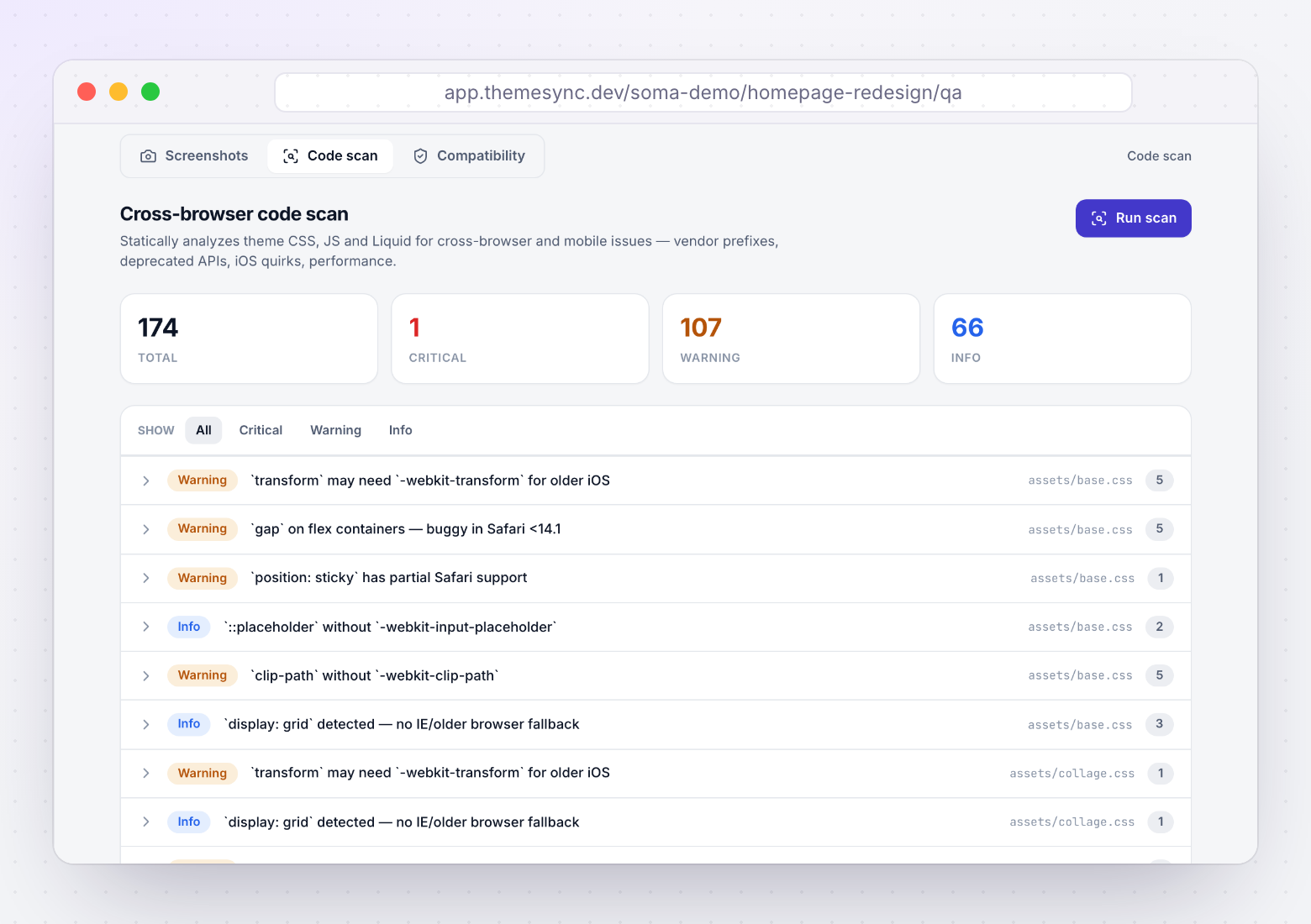
The code scan in ThemeSync (Pro and Agency) is a set of 17 pattern rules. It reads the theme's files and reports matches by file and line:
- CSS rules run on
assets/*.css. - JS rules run on
assets/*.js. - Liquid rules run on
.liquidfiles insnippets/,sections/,layout/andtemplates/.
Being plain pattern matching has consequences you should know before trusting a result:
- Most prefix checks are file-level. If
-webkit-backdrop-filterappears anywhere in the file, everybackdrop-filterin that file passes. - It doesn't know your browser targets. There's no browserslist. A rule written for IE11 fires whether or not you care about IE11.
- It doesn't see CSS in Liquid. Styles inside
{% style %}or<style>in sections aren't checked by the CSS rules, and.css.liquidassets aren't either. - At most five hits per rule per file are listed, so fix and re-scan.
It complements shopify theme check, which ThemeSync can also run (output in the console). Theme Check knows Liquid and Shopify's conventions. The code scan only looks for browser-compatibility patterns. Our Theme Check guide covers the other half.
None of this makes the scan less useful. It makes it a starting list. Each hit tells you which file and line to open, and the notes below tell you which hits deserve the time. Run it on a theme you inherited and it maps the risky corners in a minute.
Severity levels are fixed: critical means visible breakage on current devices is likely, warning means check it, and info means it's only a problem for old browsers or for performance.
The 8 CSS rules
| Severity | Browsers affected | In 2026 | |
|---|---|---|---|
| backdrop-filter without -webkit- | Critical | Safari < 18 | Fix it |
| transform without -webkit- | Warning | iOS < 9 | Legacy |
| gap with display: flex | Warning | Safari < 14.1 | Check old iOS |
| position: sticky without -webkit- | Warning | Safari < 13 | Legacy |
| clip-path without -webkit- | Warning | Older Safari | Cheap to add |
| ::placeholder without prefix | Info | Old Safari, IE | Legacy |
| display: grid, no fallback | Info | IE11 | Legacy |
| appearance without -webkit- | Info | Safari < 15.4 | Cheap to add |
| Rule | What it matches | Fix |
|---|---|---|
| backdrop-filter-prefix (critical) | backdrop-filter: in a file with no -webkit-backdrop-filter | Declare -webkit-backdrop-filter first, then backdrop-filter, with the same value. |
| webkit-transform (warning) | transform: in a file with no -webkit-transform | Usually nothing. Add the prefix only for iOS 8 and older. |
| flex-gap-safari (warning) | Any gap: in a file that also contains display: flex | Check on an older iPhone. If needed, use margins on children or a grid container. |
| position-sticky (warning) | position: sticky with no -webkit-sticky | position: -webkit-sticky; position: sticky; if you support Safari 12. |
| clip-path-prefix (warning) | clip-path: with no -webkit-clip-path | Add -webkit-clip-path with the same value. |
| placeholder-prefix (info) | ::placeholder with no :-webkit-input-placeholder | Nothing for current browsers. |
| grid-no-fallback (info) | Any display: grid | Nothing, unless IE11 is a hard requirement. |
| appearance-prefix (info) | appearance: with no -webkit-appearance | Add -webkit-appearance: none; next to it for older iOS form controls. |
The one that still bites: backdrop-filter. Safari only dropped the prefix requirement in Safari 18, so every iPhone still on iOS 17 or earlier ignores the unprefixed property. The frosted sticky header turns into a see-through bar over the hero image, and text becomes unreadable. That's why it's critical.
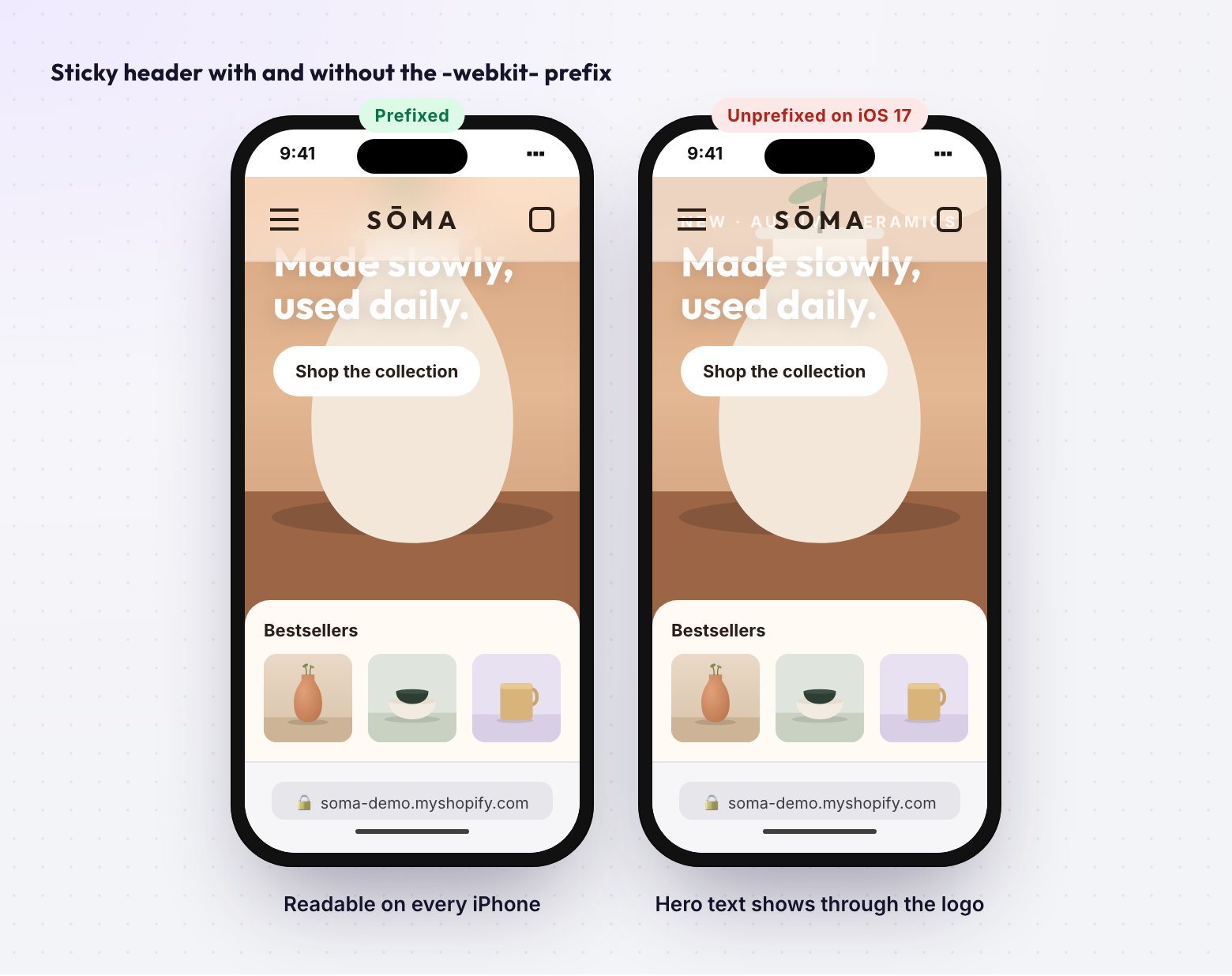
/* Before: plain transparent bar on iOS 17 and earlier */
.header--sticky { background: rgb(255 255 255 / 0.6); backdrop-filter: blur(12px); }

/* After */
.header--sticky {
  background: rgb(255 255 255 / 0.6);
  -webkit-backdrop-filter: blur(12px);
  backdrop-filter: blur(12px);
}
The noisy one: flex-gap-safari fires on any gap in a file that also uses flex, including gap on grid containers, which never had the bug. Safari 14.1 shipped in 2021. Treat it as "look at it once on an old iPhone", not as a bug.
The 5 JavaScript rules
| Severity | Browsers affected | In 2026 | |
|---|---|---|---|
| fetch() without a polyfill | Warning | IE11 | Legacy |
| IntersectionObserver | Warning | iOS < 12.2 | Legacy |
| customElements.define | Info | IE11 | Legacy |
| Optional chaining ?. | Info | Safari < 13.1 | Legacy |
| Nullish coalescing ?? | Info | Safari < 13.1 | Legacy |
| Rule | What it matches | Fix |
|---|---|---|
| fetch-no-polyfill (warning) | fetch( in a file that doesn't mention a polyfill | Nothing for current browsers. Add whatwg-fetch only for IE11. |
| intersection-observer (warning) | IntersectionObserver without a polyfill mention | Nothing for current browsers. The polyfill covers iOS 12.1 and older. |
| custom-elements (info) | customElements.define( | Nothing. Dawn and most 2.0 themes are built on custom elements. |
| optional-chaining (info) | Any ?. | Nothing, unless you ship untranspiled code to Safari 13.0 or older. |
| nullish-coalescing (info) | Any ?? | Same as optional chaining. |
Here's the honest note. If your theme is built on Dawn or another Online Store 2.0 theme, every one of these rules will fire, and none of them points at a real bug for shoppers on current devices. The theme's own JavaScript already needs a browser that has fetch, custom elements and modern syntax. Adding polyfills for one feature doesn't make the rest work in IE11.
The regex for optional chaining also matches ?. inside strings or comments, so expect some hits that aren't code. The rules are useful in one case: a legacy theme with a documented old-browser target, or third-party scripts you're auditing before adding them.
The 4 Liquid rules
| Severity | Problem type | In 2026 | |
|---|---|---|---|
| document.write() | Critical | Breaks script | Fix it |
| Synchronous XMLHttpRequest | Warning | Freezes page | Fix it |
| {% render %} inside {% for %} | Warning | Performance | Check snippet |
| Inline <script> over 3,000 chars | Info | Performance | Worth moving |
| Rule | What it matches | Fix |
|---|---|---|
| document-write (critical) | document.write( in any Liquid file | Insert elements with createElement and append, or load the script with defer. |
| synchronous-ajax (warning) | .open(..., false), a synchronous XHR | Make it async, or switch to fetch. |
| render-in-for (warning) | A {% render %} line between {% for %} and {% endfor %} | Check what the snippet does per item. For simple cases, use {% render 'card' for products as product %}. |
| large-script-tag (info) | An inline <script> block longer than 3,000 characters | Move it to assets/*.js and load it with defer. |
document.write is usually in an old tracking snippet pasted into theme.liquid years ago. Browsers ignore document.write called from an async or deferred script, and Chrome can block scripts it injects on slow connections. The result is a tag that silently doesn't run.
Synchronous XHR freezes the page until the request finishes, and browsers log a deprecation warning for it on the main thread. It mostly turns up in old cart or currency scripts.
render-in-for needs judgement. render is what Shopify recommends for snippets, and rendering a product card per product is normal. The rule is a prompt to open the snippet: if it loops over all variants or runs heavy filters per item, that cost multiplies. Don't switch to include, which is deprecated. The check is line-based, so it can also miss nested loops or flag a render after a single-line loop.
Large inline scripts are re-sent with every page instead of being cached. On mobile that shows up as Total Blocking Time in a performance audit.
How to triage a scan result
On a typical Online Store 2.0 theme, expect a long list dominated by info and legacy warnings. A workable order:
- Fix every critical. Both critical rules point at problems on devices people use today.
- Fix synchronous XHR wherever it appears.
- Add the cheap prefixes:
-webkit-clip-pathand-webkit-appearance. They cost a line each. - Open each render-in-for hit and decide whether the snippet is heavy.
- Move large inline scripts to assets when you're already editing the file.
- Note the legacy rules and move on, unless the client has a written browser support policy that includes IE11 or old iOS.
Then confirm with screenshots. A pattern match only says "this might break". A capture on Real Safari on an iPhone shows whether it does. The mobile Safari bugs checklist covers what the scan can't see, such as 100vh and input zoom.
How ThemeSync runs the scan
The code scan runs against the theme's working files on Pro and Agency. The result appears on the theme's overview in the Theme health card, next to image sources, app-block compatibility and screenshots, with the full list by file and line under QA & Screenshots.
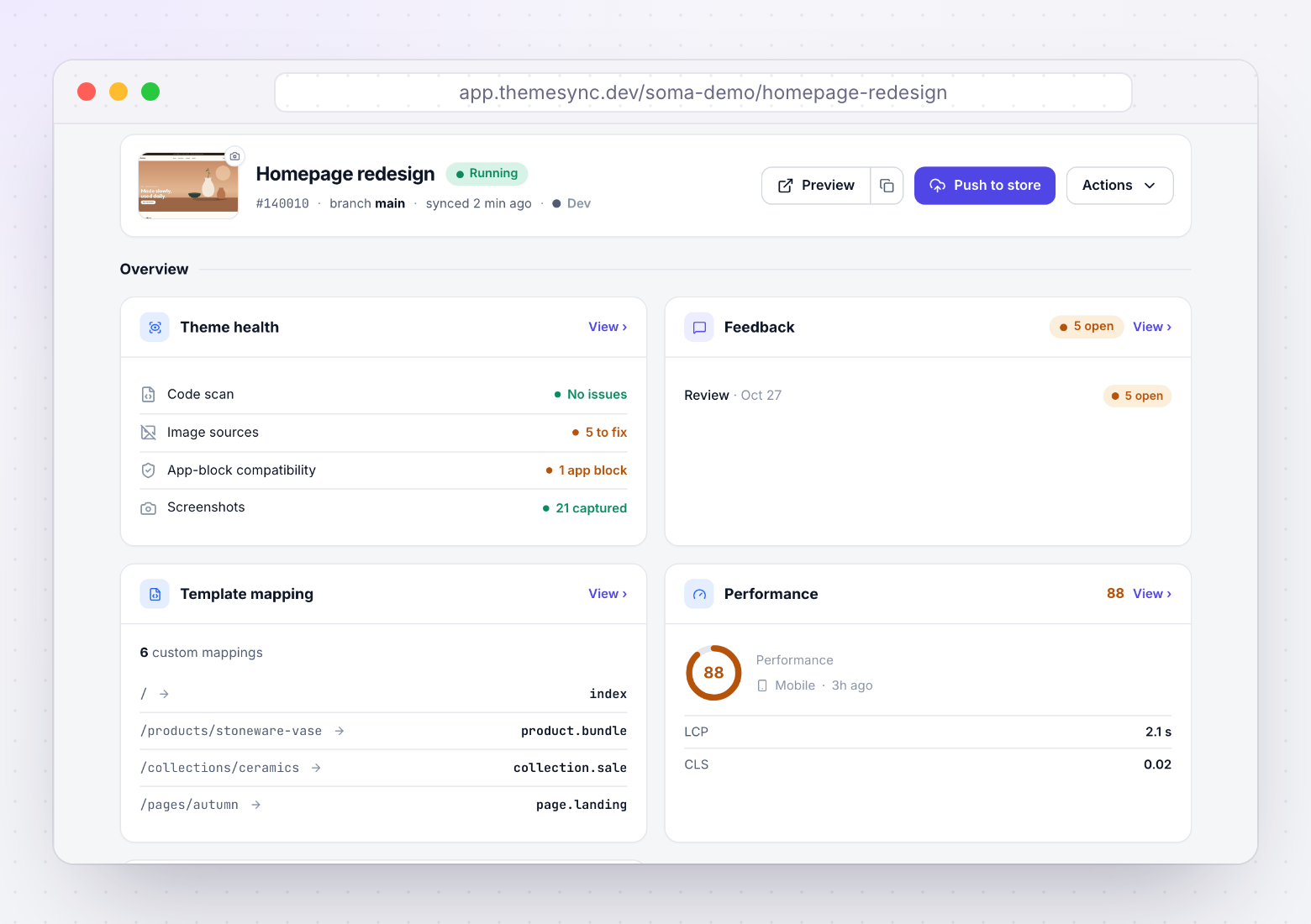
Because it runs alongside Visual QA, you can check a backdrop-filter hit against a WebKit or Real Safari capture of the same page in the same session. The scan doesn't rewrite your CSS or JavaScript. Fixes are yours to make and commit.
Takeaways
- The scan is 17 pattern rules over CSS, JS and Liquid: 2 critical, 8 warnings, 7 info.
backdrop-filterwithout-webkit-still breaks on iOS 17 and earlier. Always fix it.document.writeand synchronous XHR are worth removing on any theme.- The five JS rules and several CSS prefix rules target IE11 or pre-2021 Safari. On a 2.0 theme, they're informational.
- render-in-for is a prompt to inspect the snippet, not a bug.
- Confirm every hit with a real Safari screenshot before spending time on it.
Scan the code, then check it on a real iPhone
ThemeSync runs the code scan and captures the same pages in Chromium, Firefox, WebKit and Real Safari, so you can tell real bugs from legacy warnings.
Try ThemeSync Free →