BFCM 2026 Theme Code Freeze: A Week-by-Week Plan for Agencies
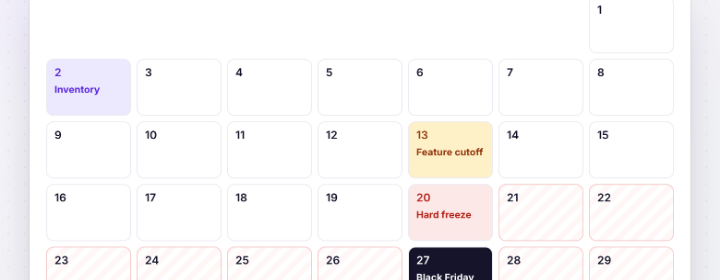
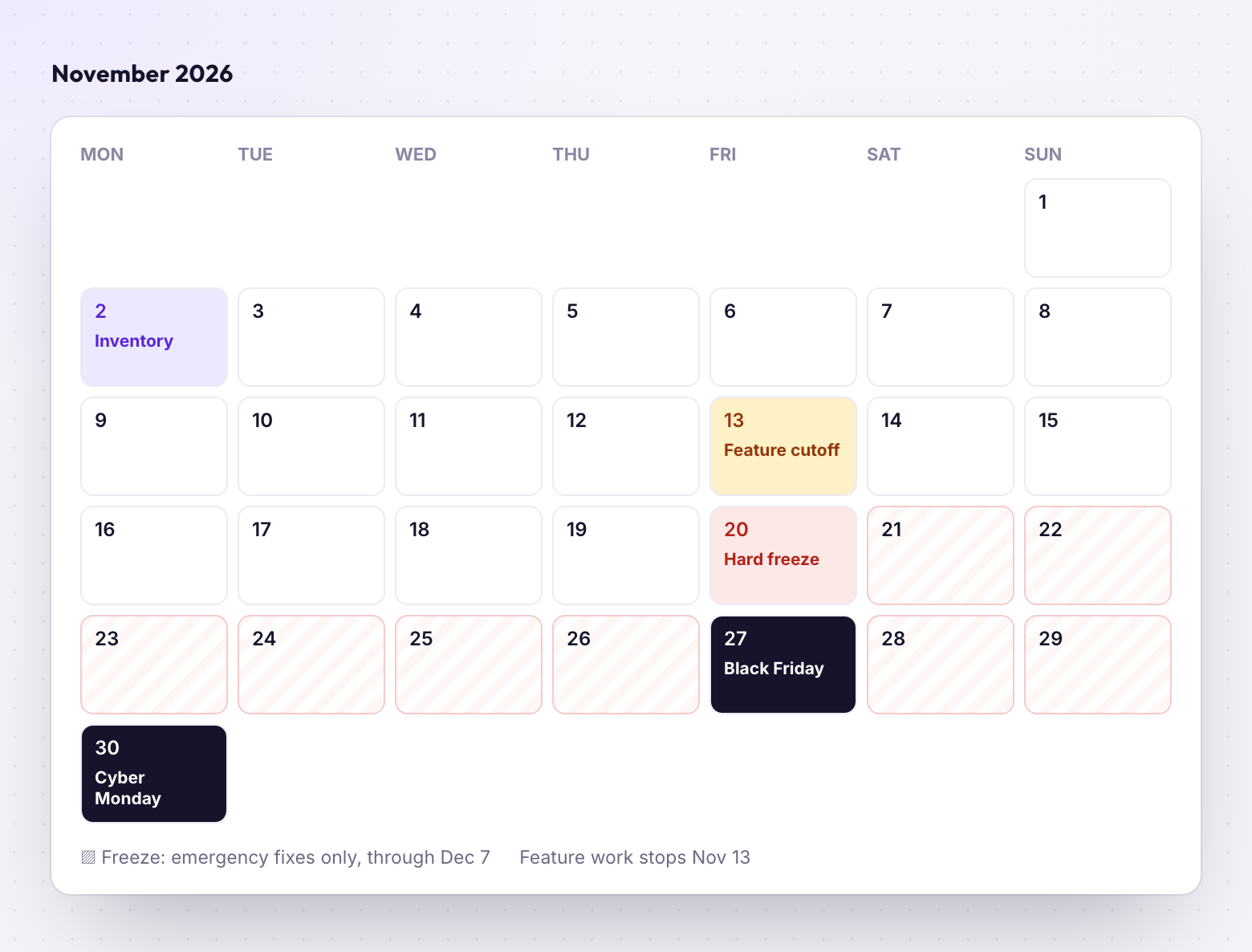
Black Friday is November 27 and Cyber Monday is November 30. The theme work that breaks stores in that week is almost always shipped in the two weeks before it.
Why themes break in BFCM week
Platform outages are rare. What takes stores down in late November is ordinary work shipped under pressure:
- A promo banner section pushed to the live theme on Thursday night, untested on mobile Safari.
- A new app installed for a bundle offer that injects an app embed and doubles page weight.
- A merchant edit in the theme editor overwritten by a deploy, removing the sale copy.
- A countdown timer script that throws on iOS and blocks the add-to-cart button.
- A JSON template referencing a collection that only exists on staging.
None of these needs a clever fix. They need a calendar and a rule about what's allowed when.
Nov 2–13: finish and inventory
Write down every change planned before Black Friday: theme sections, apps, scripts, promo templates, navigation. Anything not on the list by November 13 waits until December.
- Build promo sections now, even if the copy isn't final. Copy changes in the editor are low risk; new Liquid in week three is not.
- Install BFCM apps now. Check every app embed and block on a preview, then on the live theme's duplicate.
- Create alternate templates for sale collections and landing pages, and check which URLs actually use them. Our guide to finding every page a template touches covers this.
- Agree the approvers. One person on your side and one on the client's who can say yes to an emergency change.
Nov 13–20: QA and lock
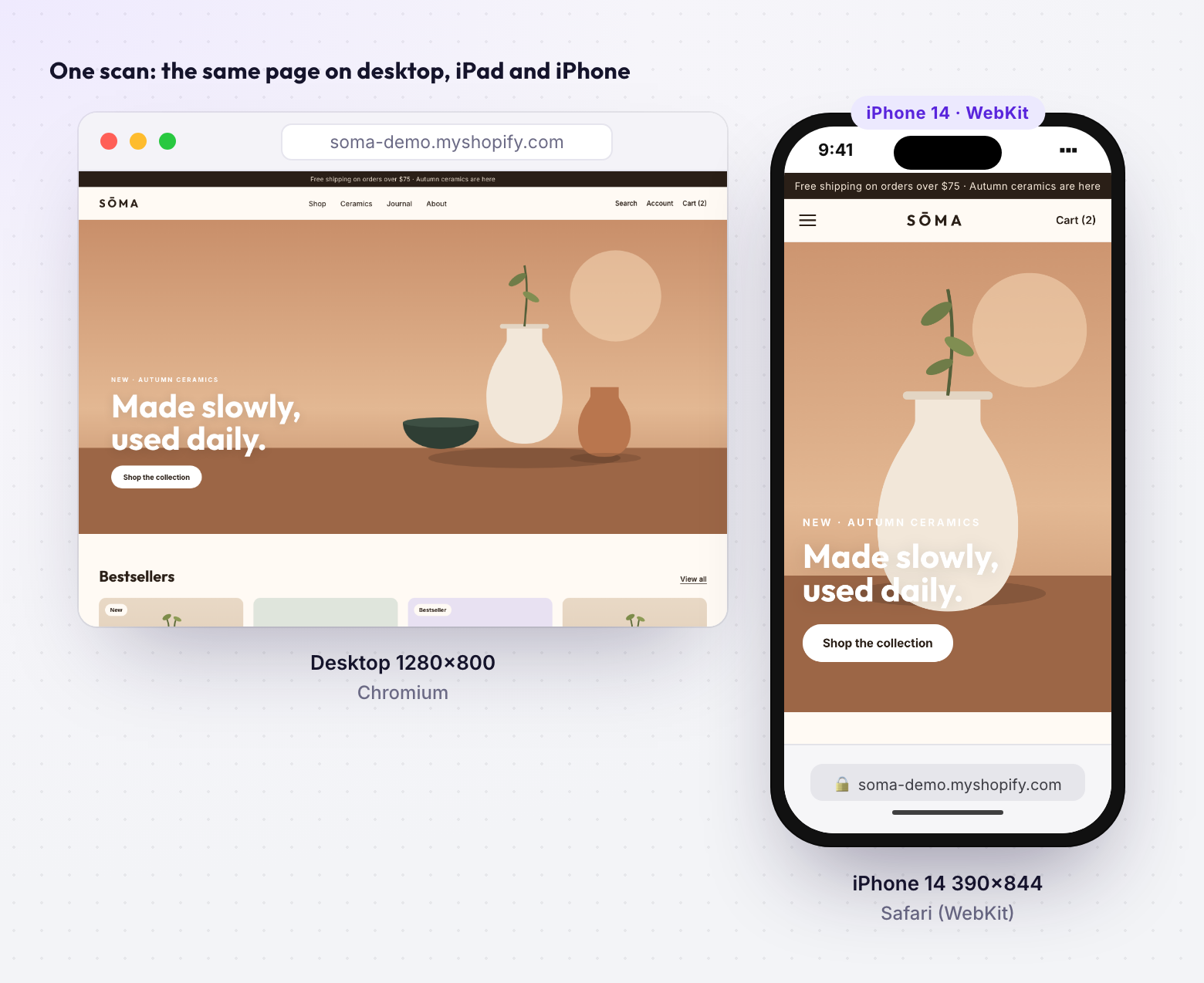
This week is for testing what will be live on Black Friday, on the devices shoppers use. Mobile is the majority of BFCM traffic for most stores, and iOS Safari is where theme JavaScript most often fails.
| Desktop | Iphone safari | Android | |
|---|---|---|---|
| Homepage with sale hero | Test | Test | Test |
| Sale collection (filters, sorting) | Test | Test | Test |
| Top 5 product pages | Test | Test | Test |
| Cart drawer and cart page | Test | Test | Test |
| Bundle / upsell app blocks | Test | Test | Test |
- Run a performance audit on the homepage and top product page with all BFCM apps enabled, and compare it with October. A large drop usually means a new app or an unoptimised hero image.
- Get sign-off per page and device, recorded, not a thumbs-up in Slack. See per page, viewport and role sign-off.
- Back up the live theme. Duplicate it and name it
BACKUP — pre-BFCM — 2026-11-20, and make sure the live theme is committed to git.
Nov 20–Dec 7: the freeze rules
Put these in writing and send them to the client before November 20:
- No new features, sections or apps until December 7.
- Content changes are allowed in the theme editor: copy, images, which products are featured.
- Code changes are emergency fixes only, meaning something is broken for shoppers.
- Every code change follows the emergency path below, with no exceptions for "it's just one line".
- No deploys from a branch that hasn't pulled the live theme's latest editor changes. Otherwise you'll overwrite the merchant's sale copy. The theme editor sync guide explains why.
The emergency fix path
- Reproduce and write it down5 min
Which page, which device, what the shopper sees. One sentence each.
- Fix on a development theme15–30 min
Never edit the live theme directly. Pull the live theme first so the fix sits on current files.
- Screenshot the affected pages5 min
Same pages, on desktop and iPhone at minimum, so the approver sees the result.
- One named approver says yes5 min
Recorded in the review tool or ticket, with time and name.
- Push only the changed files5 min
Use --only for the files you touched, then verify on the live store and note the rollback.
shopify theme push --theme 123456789 --allow-live \
  --only sections/promo-banner.liquid \
  --only assets/promo-banner.css
On WooCommerce, the equivalent is deploying a single tested theme build, not editing files over FTP on the live server. Deploying from git without FTP walks through it.
WooCommerce-specific checks
WooCommerce 11.3 is scheduled for the week of November 9, which lands inside the QA window. Decide now whether you'll update before or after BFCM; for most stores, after. If you do update, read the developer advisories first: 11.3 changes how on_sale combines with include/exclude in the products API and adds stricter validation on REST refunds.
- Pause automatic plugin updates during the freeze.
- Check page caching rules exclude cart, checkout and account pages.
- Load-test checkout if the host offers it, and confirm the plan's PHP worker limits.
- Take a full database and files backup on November 20.
How ThemeSync helps during the freeze
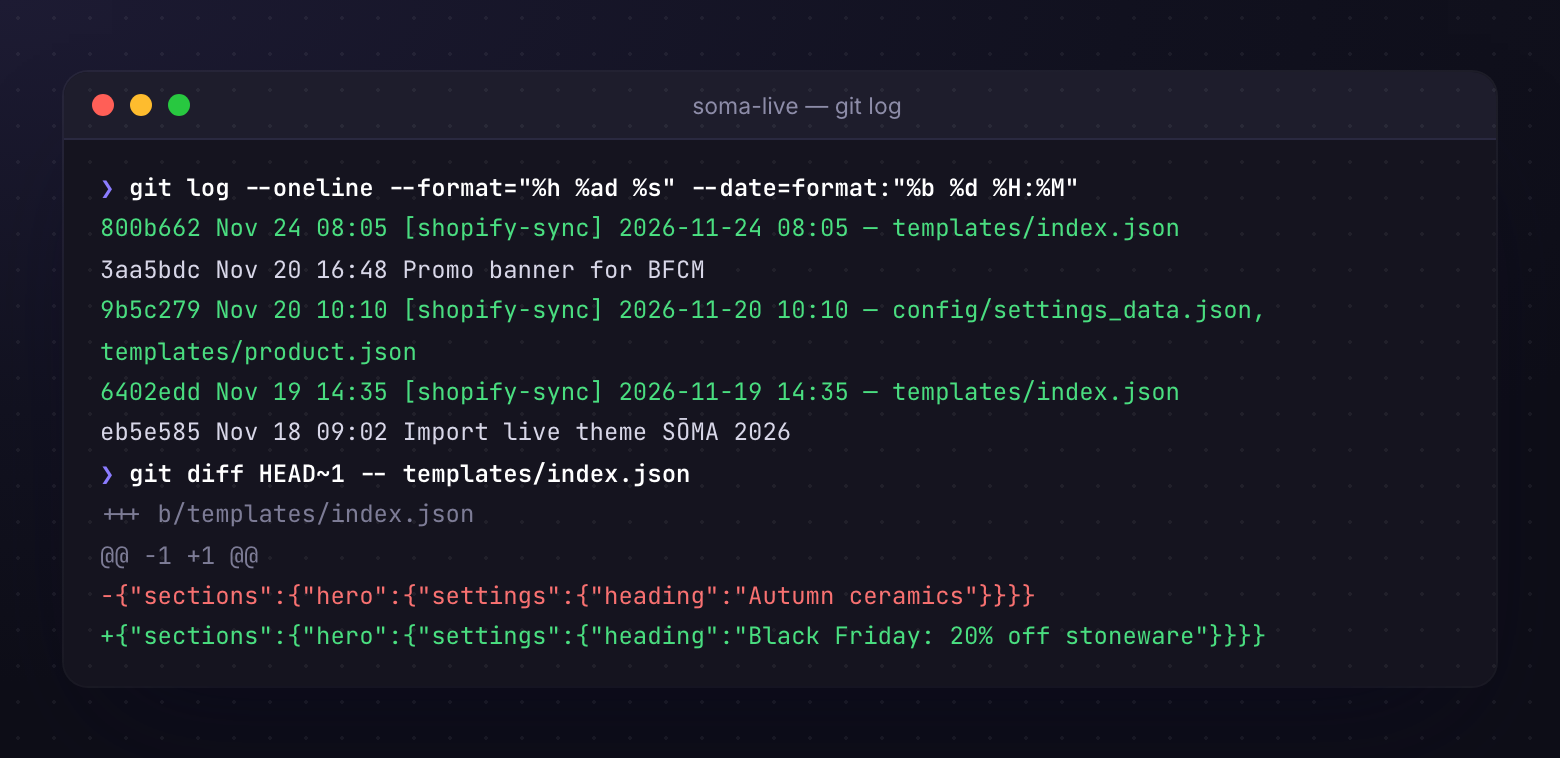
- Live Theme Tracking commits the live theme to git on a schedule, so every merchant edit during BFCM is a diff you can read, and a deploy can't silently erase it.
- Visual QA captures the same pages across Chromium, Firefox, WebKit and real iPhone Safari in one run, which is the QA matrix above in a few minutes.
- Sign-off per page and device records who approved the emergency fix and when (Agency plan).
- Performance audits run PageSpeed against the preview, so you can compare before and after a fix.
- Cloud Preview keeps the fix on a development theme your approver can open, without publishing anything.
Takeaways
- Black Friday is November 27, 2026; Cyber Monday is November 30.
- Feature cutoff November 13, hard freeze November 20, lift on December 7.
- During the freeze, content edits are fine and code changes are emergencies only.
- Every emergency fix goes dev theme, screenshots, one approver, push changed files only.
- Back up the live theme and commit it to git before the freeze starts.
- Hold WooCommerce 11.3 until after BFCM unless you've tested it.
Get through BFCM with a record of every change
ThemeSync tracks live themes in git, screenshots fixes across browsers and real iPhones, and records who signed off.
Try ThemeSync Free →